Windows 10 Driver Installation , BKR Service radios FW

Public - Rev. 10/26
Issue: USB driver has been updated to CDC-NCM to ensure forward compatibility with more devices and more robust feature set.
Importance: High
Affected Models: BKR 9000, BKR 5000, KNG-M, KNG2, KNG-P
Recommended Action: For Windows 11 users, no action is necessary, new device driver “UsbNcm Host Device” will be automatically detected and used. For Windows 10 users, the operating system must be manually directed to the proper driver after appearing as “NCM Gadget” in the device manager.
Steps to resolve for Windows 10 OS:
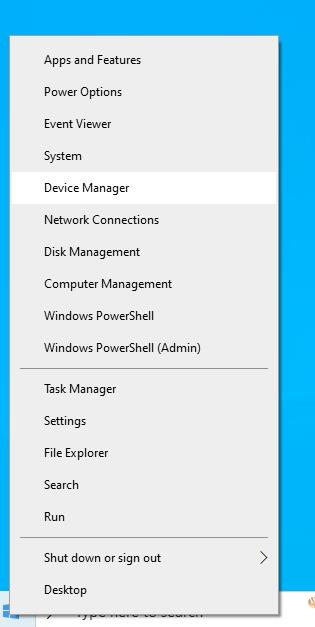
- Right click on the Start Menu icon, select “Device manager” from the list:
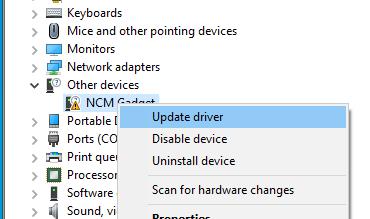
- Radio will appear as “NCM Gadget” under “Other devices” right click and select “Update driver”
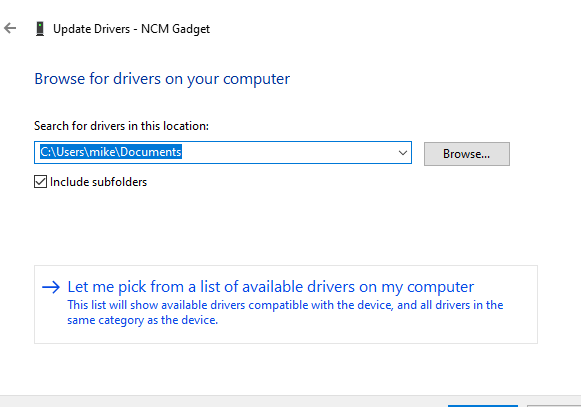
- In the window that appears, select “Let me pick from a list of…”
- Select “Network Adapters” for your device’s type.
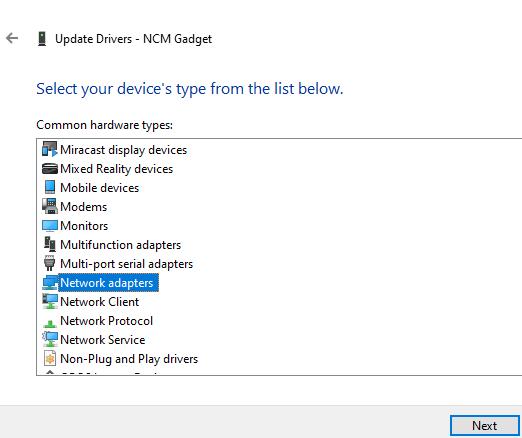
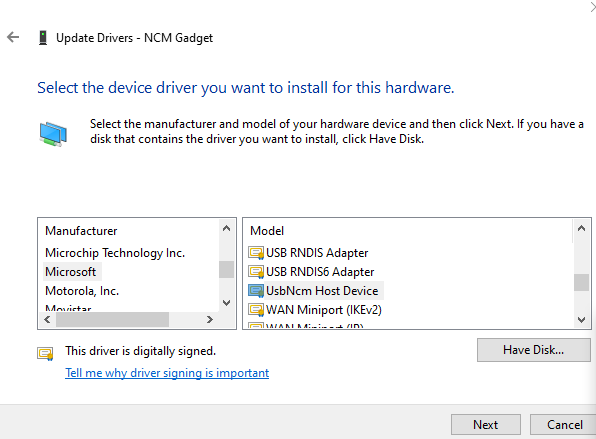
- For “Manufacturer” select “Microsoft” and “Model” select “UsbNcM Host Device” and click “next”
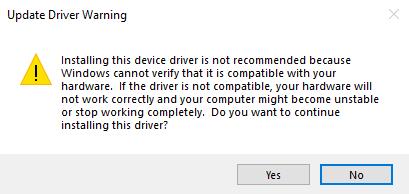
- Windows will warn that it cannot verify the device type. We are sure which device is connected, click “yes” to continue.
Verify that “UsbNcm Host Device” now properly appears in device manager under “network adapters” new driver is successfully installed.