
Loading System keys in Windows 11,Re-installing WMIC

Public - Rev. 10/26
Issue: In some instances, RES will fail to load both child and master system keys on Windows 11 machines. This is the result of a missing dependency in WMIC in newer Windows 11 installations (greater than 24H2).
Importance: Medium
Affected Models: BKR 9000, BKR 5000, KNG-M, KNG2, KNG-P
Recommended Action: Install WMIC “Feature on Demand” in Windows 11
Procedure:
- Right click on the Windows Start Button and select “Windows PowerShell (Admin)”
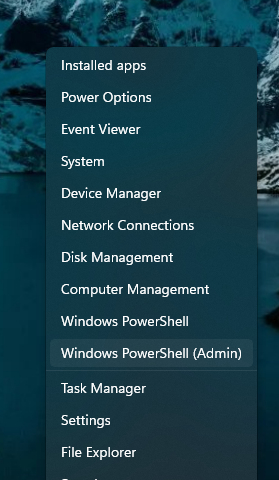
- Run the following command (copy and paste without quotes for ease)
"add-WindowsCapability -online -name WMIC"
An active internet connection, and for enterprise environments, network connection to WSUS, will be required to perform this action.
An installation of the Windows feature will run it could take some time. Once this is done, relaunch RES and attempt to load the system key as normal.